EU DPP Registry: How to Register a Digital Product Passport
How to verify your organisation, register a Digital Product Passport and make it discoverable through the new central EU Registry, including prerequisites, current limitations and common errors.
Quick summary
First, the DPP is created and hosted outside the Registry. The economic operator then verifies its organisation in the EU Registry and registers the passport through its resolvable product identifier.
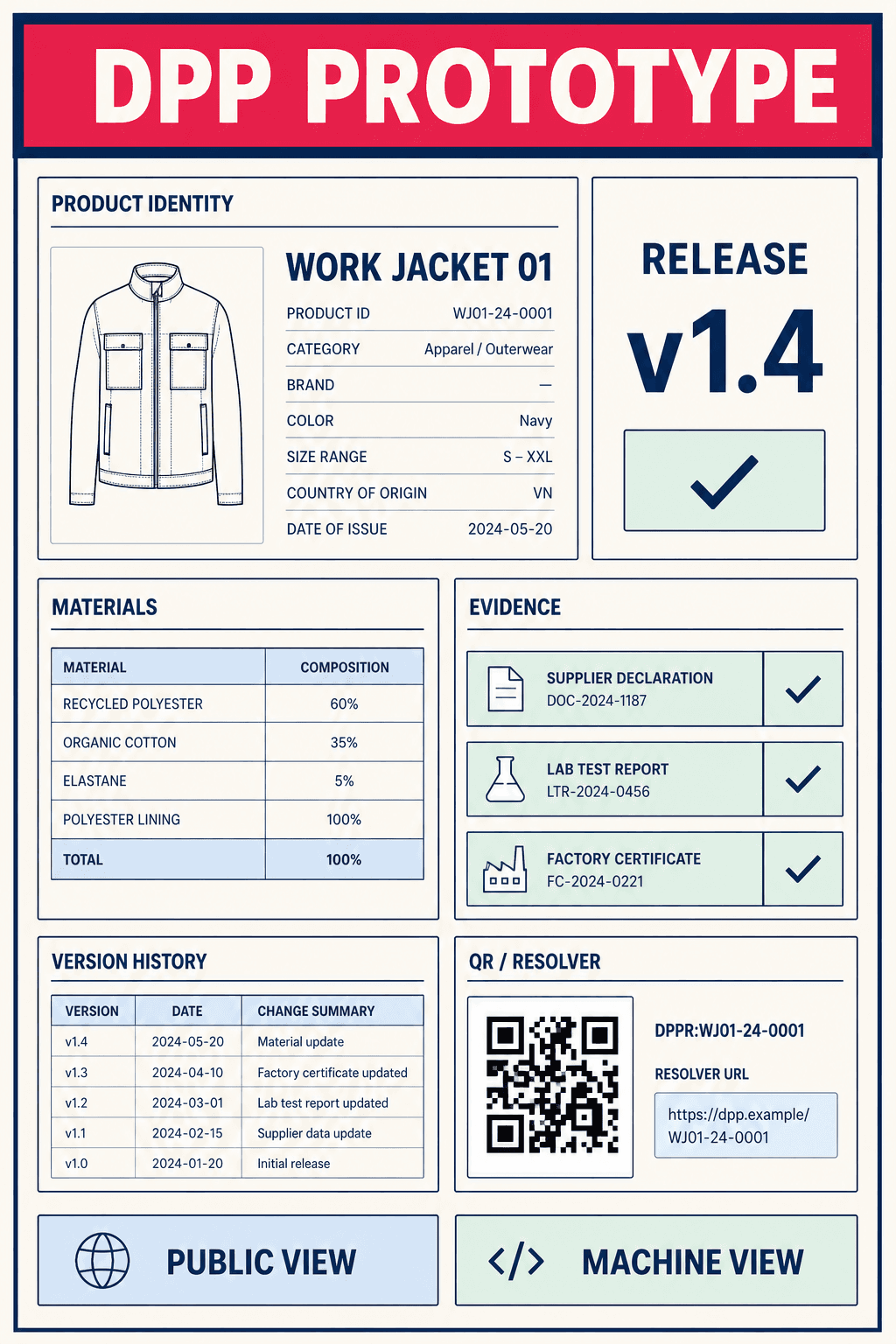
This page explores one part of the Digital Product Passport. For implementation, the DPP data model connects product identity, fields, evidence and access rights.
The new EU DPP Registry is live — with one important limitation
Since 20 July 2026, companies can access the European Commission’s official DPP Registry, sign in through EU Login and verify their organisation. The EU has also published a 51-page guide for economic operators.
Status on 21 July 2026: successful DPP registration is not available yet
The v1.0 guide explicitly states that DPPs cannot yet be registered successfully. “Batteries” is selected as the first product group, but its required semantic catalogue is not complete. Organisations can verify now and prepare the workflow in the test environment; production registration must wait until the schema is enabled.
The Registry launch is also not a new blanket compliance deadline for every company. Whether and when a Digital Product Passport (DPP) must be registered depends on the relevant product group and applicable EU law. See the overview of DPP product groups and timelines.
What is the DPP Registry — and what is it not?
The EU Registry is the central index in a decentralised DPP architecture. It does not store the complete product, sustainability and compliance dataset. That information remains with the responsible economic operator or an appointed DPP software and hosting provider. The Registry instead stores identifiers, registration data, metadata and references that allow authorities and technical systems to locate and verify the correct passport.
Feature | Digital Product Passport | DPP Registry record |
|---|---|---|
Content | Full product-specific mandatory and optional dataset | Identifiers, registration data and selected metadata |
Storage | Economic operator or DPP service provider | Central European Commission infrastructure |
Access | Via UPI and data carrier such as QR or Data Matrix | Via Registry interface and API |
Responsibility | Economic operator remains responsible for accuracy and availability | Commission operates and secures the Registry service |
Purpose | Information for consumers, value-chain actors and authorities | Indexing, validation, customs and market surveillance |
The correct sequence
You do not register an empty placeholder. First, the structured passport is created, hosted and made resolvable through its UPI. Only then is that DPP registered.
From EU Login to proof of registration
The process at a glance
Organisation, passport data and the Registry record are three separate work packages. Together, they produce a registered and persistently accessible DPP.
1. Verify the organisation
Create an EU Login, enrol the organisation and apply a qualified signature or seal to the EU declaration.
2. Create and host the DPP
Build the product-specific dataset under the applicable schema, expose it through a persistent UPI and keep it current.
3. Register the DPP
Submit through the form, in JSON/XML batches or through the API, review validation and retain the proof.
Who must register a Digital Product Passport?
Under the new implementing regulation, registration is generally performed by the verified economic operator placing the covered product on the EU market or putting it into service. Depending on the applicable product law and market role, this may be a manufacturer, authorised representative, importer, distributor, dealer or fulfilment service provider. The key question is not who prints the QR code, but who is legally responsible for the product and its DPP.
The obligation only arises once the relevant EU law for the product group requires a DPP and its registration. The implementing regulation covers products under ESPR measures, batteries, construction products, toys, detergents and surfactants, and future EU passport regimes.
Where EU law permits representation, a verified third party may act on the economic operator’s behalf. Responsibility for product data and compliance does not disappear. Define roles and approvals early in your DPP implementation roadmap.
Prerequisites before registration
- EU Login for the person operating the Registry
- Legal organisation data and a reliable business identifier
- Name and email of the legal representative
- QSeal for legal persons or QES for natural persons/sole traders
- Completed and hosted DPP under the applicable product-specific data model
- Unique Product Identifier (UPI) resolving to the DPP over HTTPS
- Correct granularity: model, batch or item
- Model and batch identifiers where required for item- or batch-level passports
- Commodity code and DPP backup reference where applicable
- Ownership for updates, availability and error resolution
If the data model is not ready, start with a DPP example structure and template, then validate mandatory fields against the product-specific legal act and semantic repository.
Step 1: Create an EU Login and open the Registry
The DPP Registry uses the EU’s central authentication service. Existing EU Login users can sign in directly. Otherwise, use the EU Login registration page. After confirming the email, the production Registry redirects to authentication and then to the welcome page.
Separate production and test accounts
The EU requires a different EU Login account for the test environment and production Registry. Test data is not migrated to production and may be removed by routine clean-up.
Step 2: Enrol a company or sole trader
Select “Enrol New Organisation” and indicate whether the economic operator is a legal or natural person. This choice determines the fields, accepted identifiers and verification route.
Legal person
- Registered legal name, not merely a trading name
- Official registered address and country of registration
- Preferably a National Trade Register number (NTR); alternatively LEI, VAT, eID or local identifier
- Non-public compliance email and telephone number for authority contact
Natural person / sole trader
- First and last name plus official address
- Preferably tax identification number (TIN); alternatively personal number, eID, identity card, passport or local identifier
- Compliance email and telephone number
The EU says these contact details are not displayed publicly. Review every value carefully: changing organisation data after verification begins restarts the process.
Step 3: Verify the organisation with QSeal or QES
Only verified economic operators may register DPPs and manage existing records. The applicant does not have to be the legal representative, so the form asks for the name and email of the person who will actually sign or seal the declaration.
- Enter the legal representative’s details.
- Request the European Commission-sealed PDF declaration.
- Download the Commission-sealed PDF without modifying it.
- Legal person: countersign with a qualified electronic seal (QSeal).
- Natural person/sole trader: sign with a qualified electronic signature (QES).
- Upload the same PDF and select “Verify your Organisation”.
- Review status in the Activity Dashboard; SUCCESS makes the applicant organisation administrator.
QES and QSeal must come from a qualified trust service provider. Use the official eIDAS Trusted List to find one. The PDF declaration is currently available only in English.
Do not alter the PDF
The system expects exactly two valid signatures or seals: the Commission’s institutional seal and the organisation’s countersignature or counterseal. Modifying the sealed PDF may cause the integrity check to fail.
Step 4: Create, host and expose the Digital Product Passport
The organisation may now register, but the DPP itself is still created outside the EU Registry. It must contain the data required by the product-specific legal act and its data model. The economic operator or an appointed DPP service provider stores and maintains that content throughout the lifecycle.
The Unique Product Identifier (UPI) connects the Registry, data carrier and passport. It must resolve persistently and securely over HTTPS to the DPP data. In practice, a QR code alone is not a DPP, and a Registry entry does not replace hosting or data maintenance. Align the technical implementation with DPP requirements and timelines and the published semantic model for the product group.
When is a DPP publicly available?
Publicly available does not mean that every field is open. The data carrier or UPI must make the passport reliably accessible. Product-specific law determines which fields consumers see, which are limited to market surveillance or customs, and which actors may add updates. The Registry is the index; role-based delivery remains part of the DPP solution.
For the technical connection between UPI, carrier and hosted passport, the guide to Digital Product Passport QR codes and GS1 Digital Link explains direct URIs, resolvers and access rights.
Step 5: Register by form, file or API
Once the semantic model for the relevant product group is enabled and the DPP is ready, select “DPP Registration” from the side menu. The Registry provides three routes:
Method | Best for | Key requirements |
|---|---|---|
Online form | One DPP or manual testing | Choose granularity, provide UPI and add model/batch identifiers where relevant |
JSON/XML file | Up to 100 DPPs per submission | Use the Registry template; maximum 1 GB; filename without spaces or path characters |
API | High volumes and continuous automation | Integrate registration, status and responses; implement authentication and error handling |
Granularity: model, batch or item
Granularity is not a convenience choice. The applicable legal act determines whether the passport exists at model, batch or individual item level. If several rules require different levels for the same product, the implementing regulation requires the most granular level.
- Model: one DPP for products sharing the relevant specifications.
- Batch: one DPP for a defined production run; link the model identifier where it exists.
- Item: one DPP for an individual unit; link model and batch identifiers where those levels exist.
Current battery status
In the current guide, “Batteries” is the first and preselected product group and only item-level registration is provided. Until the battery semantic catalogue is available, however, the process cannot result in successful registration.
What the Registry validates and what proof you receive
After submission, the Commission automatically reads the accessible DPP data and checks its structure, semantic conformity, mandatory values, granularity and, where relevant, commodity code and backup reference. This does not validate the substantive truth of every claim; that remains the responsibility of the economic operator and market surveillance.
After successful validation, the Registry generates a unique persistent registration identifier and returns it through the same channel, interface or API. The economic operator may also generate electronic proof of registration for one or more DPPs. It contains the UPI, commodity code where relevant, responsible operator, timestamp and hash of the registered DPP version. It is protected by a qualified electronic seal and remains available for 90 days after generation; it can be regenerated later.
Registered does not automatically mean compliant
Proof of registration demonstrates the Registry event. It is not a comprehensive certificate that the product, data and evidence meet every substantive EU requirement.
Common verification and DPP registration errors
Error | Cause | Fix |
|---|---|---|
PDF verification fails | Commission seal or counterseal missing; PDF modified; certificate invalid | Sign the original PDF unchanged with a valid QSeal/QES and upload again |
Schema error | JSON/XML does not match the applicable product-specific model | Use the current template and semantic repository |
Invalid UPI | No HTTPS, malformed URL, disallowed domain/port or problematic redirects | Test persistent HTTPS resolution without insecure redirects |
Duplicate identifier | The same UPI appears more than once in one submission | Assign a unique identifier to every DPP |
Complete batch rejected | At least one DPP in the submission contains an error | Export the error report as CSV, correct it and resubmit the complete file |
File upload rejected | More than 100 records, over 1 GB or unsupported filename characters | Split the batch, reduce file size and use only letters, numbers, dots, underscores or hyphens |
The Activity Dashboard shows PROCESSING, SUCCESS or FAILURE. Detail reports can be reviewed, and registration errors exported as CSV. Build the same traceability into your DPP software and operating architecture so correlation IDs, submissions, versions and corrections remain auditable.
What companies should do now
- Use the EU test Registry with a separate EU Login to rehearse organisation and registration workflows.
- Obtain QSeal or QES early and designate the responsible person.
- Map relevant product groups and timelines to the product portfolio.
- Define UPI, model, batch and item identifiers consistently.
- Prepare the DPP data model, hosting and update process using the implementation roadmap.
- Test manual registration for pilot volumes and plan API integration for scale.
- Integrate proofs of registration, versions and error reports into compliance processes.
The authoritative reference remains the Implementing Regulation (EU) 2026/1778, the EU user guide v1.0 and the applicable product-specific legislation. The European Commission information page brings together the Registry, test environment, guide and help desk.
Frequently asked questions
Key answers about registration, verification and publication.
Is the EU DPP Registry already live?
Yes. Organisation enrolment, the test environment and the user guide have been available since 20 July 2026. However, the v1.0 guide says successful DPP registration is not yet possible because the semantic catalogue for the first product group, batteries, is still missing.
Does the Registry store the complete Digital Product Passport?
No. The full DPP remains with the economic operator or its DPP service provider. The EU Registry mainly stores unique identifiers, registration data, metadata and the reference to the hosted passport.
Who may register a DPP?
In principle, the verified economic operator placing the covered product on the market or putting it into service. Where the applicable EU law permits it, a verified third party may act on the operator’s behalf.
Does every company need an EU Login?
Every person accessing the Registry authenticates through EU Login. The organisation must also be enrolled and verified once as a legal or natural person.
Do I need a QES or QSeal?
Legal persons use a qualified electronic seal (QSeal) for verification. Natural persons or sole traders use a qualified electronic signature (QES). Both must be issued by a qualified trust service provider.
Can I register multiple DPPs at once?
Yes. File upload accepts JSON or XML with up to 100 registrations per file. If one DPP fails, however, the complete submission is rejected. The API is the intended automation path for larger volumes.
Does registration automatically make my DPP public?
No. Registration creates the official index record. The underlying DPP data must be hosted separately and remain resolvable through the unique product identifier. The applicable product rules determine which data is public and which is role-restricted.
Is proof of registration proof of compliance?
It demonstrates that the registration obligation was fulfilled. It does not confirm that the product or passport substantively complies with every EU requirement; the economic operator and market surveillance remain responsible for that.
Go beyond enrolment: become registration-ready
The Registry form is the final step. Product identifiers, data model, evidence, hosting, responsibilities and change processes must align first. I help companies make those technical and organisational pieces work together.

Written by
Nils
Nils Abegg is a developer with more than 15 years of experience, including around ten years in e-commerce. Since 2023, he has focused on agentic AI and enjoys building practical AI solutions for small and medium-sized businesses.