AI agent, copilot, chatbot, workflow and RPA: the differences
These terms are frequently mixed in product messaging. This guide compares initiative, path control, tool access, action rights, human control and typical failure consequences.
Quick explanation
Chatbot and copilot mostly describe interaction. Workflow and AI agent differ in who chooses the next step. RPA is an execution method for interfaces without a suitable API.
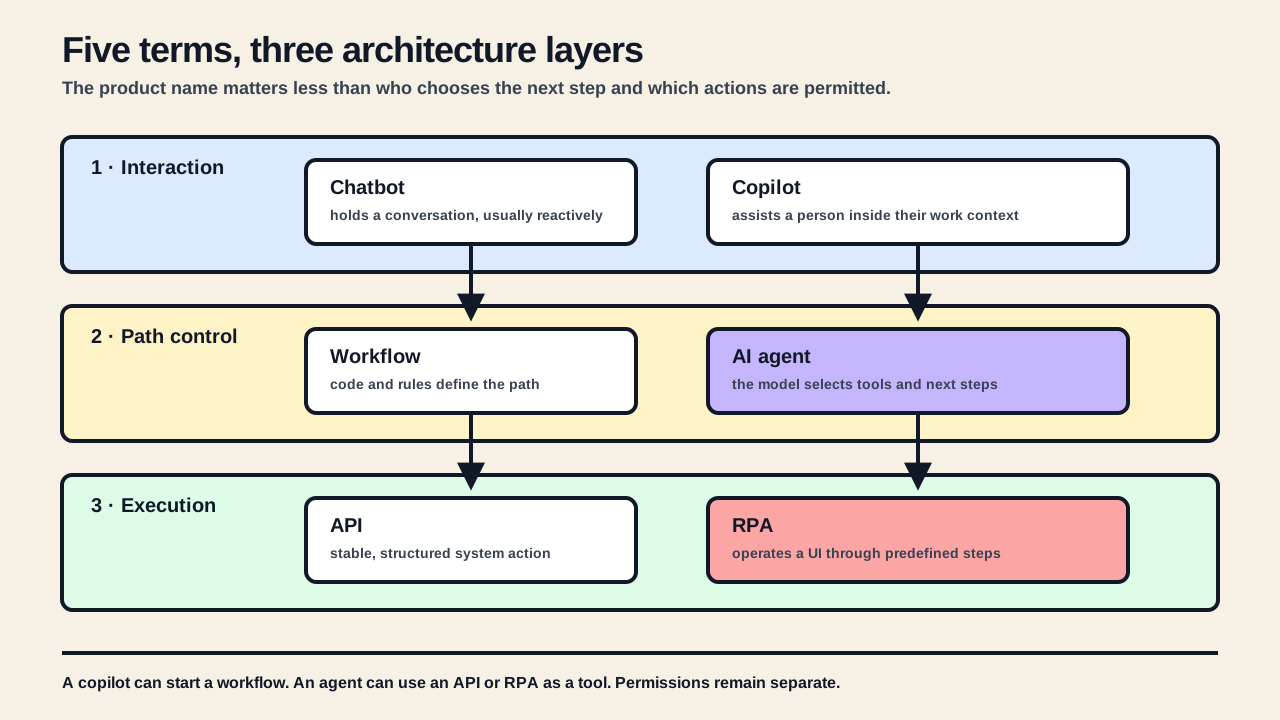
The label reveals little about the actual architecture
One vendor calls a product an “agent” even though it answers a question and waits for the next click. Another sells a “copilot” that changes records on its own. There are LLM workflows, RPA robots with chat interfaces and chatbots that call internal APIs. The names sound like distinct product categories, but they are not reliable technical specifications.
Six questions are more useful for architecture: Who starts the work? Who selects the next step? Which data may the system read? Which tools can it choose? Which actions may it execute? Who handles the consequences when a decision is wrong?
The AI automation pillar guide explains how bounded AI steps fit controlled business processes. The AI automation in e-commerce guide maps suitable commerce processes. This page deals with the architecture terms that are routinely mixed during product selection.
The terms sit on different layers
Chatbot and copilot usually describe how a person interacts with a system. Workflow and agent describe how execution is directed. RPA describes how software operates a user interface. The same production system can contain all of them.
The comparison at a glance
Approach | Who controls the path? | System access | Typical human role | Primary risk |
|---|---|---|---|---|
Chatbot | Conversation logic and user input | None or read access | asks and checks answers | fluent but incorrect information |
Copilot | The person, assisted by AI | Contextual, often read or prepare | remains accountable for the result | accepting a suggestion without checking |
Workflow | Code, rules and defined branches | Preselected APIs and actions | handles exceptions or approvals | an unmodelled exception |
RPA | Recorded or programmed UI steps | Web, desktop or terminal UI | monitors fragile runs | a UI change or wrong screen state |
AI agent | The model within goals and constraints | Selects among permitted data and action tools | sets limits and receives risky cases | errors compound across steps |
This is an architecture comparison, not a legal classification. European Commission guidance on the AI-system definition says assessment depends on the concrete characteristics of a system. A label such as “copilot” or “agent” therefore determines neither the architecture nor its regulatory treatment.[1]
An address change exposes the differences better than a definition
A customer writes: “Please send my order to the company address from my previous order.” Payment is complete. The shop contains a private address, the CRM has several company contacts and the ERP may already have released the order to the warehouse. The interface can look identical while the technical responsibility is entirely different.
The chatbot explains or collects information
A basic chatbot explains the change deadline or asks for the order number and new address. Without dependable system access, it must not claim the change is complete. Its output is an answer or a structured handover record.
The copilot prepares a decision
A service copilot shows the employee the order, fulfilment status and possible company addresses. It drafts a reply and may prepare a change. The employee checks identity, address and shipping state before confirming. The system reduces research and typing without silently transferring accountability.
The workflow follows a defined case tree
A workflow checks a fixed sequence: identity confirmed, order not released, destination country unchanged and address validated. If all conditions pass, it calls a defined API; otherwise it creates a ticket. An LLM may classify the email or extract address fields without controlling the process.
RPA operates the legacy system
If the ERP lacks a usable API, an RPA flow can enter the approved address into the intended fields. It clicks and types along a known path. RPA does not decide whether the change is permitted; that decision belongs before the UI run.
The agent selects among several next steps
An agent may decide whether to read order data, request missing information, call address validation or hand the case to service. The actual write still needs fixed permissions, thresholds and approvals. Understanding the request does not grant permission to reroute an order already in fulfilment.
Chatbot and copilot mainly differ in the working relationship
A chatbot is first an interface for conversation
A chatbot accepts conversational input and produces replies. It may be rule-based, LLM-based or the front end of a workflow. The channel does not reveal whether an answer comes from model memory, a knowledge base or current commerce data. Tool access alone does not make the interface an autonomous agent.
A copilot works visibly beside a person
“Copilot” describes an assistance role: the system summarises, researches, drafts or prepares an action in the context of the person’s current work. Microsoft similarly distinguishes a built-in Copilot from specialised agents that add knowledge, skills and external services. That distinction also shows why the label is not a fixed technical boundary.[2]
A copilot fits work where domain judgment remains frequent but people should not collect every document and system context manually. It is not a security control. Suggestions need sources, visible uncertainty and an explicit difference between prepared and executed.
Workflow and RPA are predictable automation on different layers
A workflow has a defined control flow
A workflow connects triggers, checks and actions through modelled paths. Individual steps may use AI to classify an email, extract PDF values or draft a response. Branches and permitted actions remain in code or workflow configuration.
Anthropic makes the same architecture distinction: workflows orchestrate models and tools through predefined code paths, whereas agents let the model direct the process and tool use dynamically. For cleanly decomposable work, Anthropic recommends the simpler approach and notes that agentic complexity trades additional latency and cost for flexibility.[3]
RPA replaces missing programmatic access
Robotic process automation operates an interface as a person would. Microsoft describes desktop flows as automation for repetitive rule-based work across web, desktop and legacy applications. This is useful in an API prison, but less stable than a supported API: window state, selectors, sessions and UI changes become operating concerns.[4]
RPA is an execution method, not decision logic
RPA is not another name for an AI agent. A workflow can invoke RPA. An agent can use RPA as a tightly bounded tool. In both cases, the business decision and UI operation should be tested and logged separately.
An AI agent controls part of its own execution
An agent receives a goal, context, instructions and a set of permitted tools. The model evaluates the current state, chooses a next step, processes the tool result and decides whether to continue, ask, stop or hand over. Part of the path is created during execution.
OpenAI explicitly separates simple chatbots and single model calls from agents: in an agent, the model manages workflow execution, recognises completion or failure and selects tools dynamically within guardrails. Those tools may retrieve data, perform API actions or operate a computer interface.[5]
Tool access is necessary but insufficient
A chatbot that always calls one search function is not automatically an agent. The key is whether the model controls execution over multiple states. Conversely, an agent may have read-only tools and merely prepare suggestions. Autonomy and write permission are separate axes.
More flexibility expands the test surface
A fixed script has known paths. An agent may use tools in an unexpected order, stop too early or misjudge a plausible intermediate state. It needs maximum step counts, time and cost budgets, permitted state transitions, idempotent actions, human handover and tests of full trajectories rather than isolated replies.
A production system often combines the terms
Layer | Question | Possible components |
|---|---|---|
Interaction | How does a person provide an instruction and feedback? | Chatbot, copilot, form, email |
Path control | Who selects branches and next steps? | Workflow, rules, AI agent |
Execution | How is a target system read or changed? | API, queue, RPA, database access |
Control | What limits errors and permissions? | Validation, approval, roles, audit log, fallback |
A service copilot may start a deterministic workflow. The workflow may use one AI classification step and RPA for a legacy ERP. An agent may use the same copilot interface while holding read-only tools. The design becomes understandable only when each layer is named separately.
Which approach fits which process?
Process characteristic | Usually the best starting point |
|---|---|
Only information or data collection in a conversation | Chatbot with grounded sources and clean handover |
A specialist should research and decide faster | Copilot with read access and prepared actions |
Steps and rules are stable and describable | Deterministic workflow; AI only for variable subtasks |
The target system lacks an economical API | RPA as a bounded execution layer after validation |
Next steps depend on open-ended context | Agent with a small tool space, budgets and stop conditions |
The action is financial, legal or hard to reverse | Human approval regardless of the product label |
The sensible answer is often a combination, but not the most complicated combination. If a fixed branch works, an agent does not improve operations automatically. If specialists must reinterpret every exception, a pure workflow may collapse under a growing rule set.
- Start with the smallest component that reliably reaches the process outcome.
- Separate read, suggest, prepare and write permissions.
- Prefer supported APIs to RPA when both routes are operationally and economically available.
- Expand agent autonomy only after realistic tests and visible failure paths.
- Measure correction effort and critical errors, not only reply quality or demo speed.
Measurement follows the responsibility assigned to the system
A chatbot needs factual, grounded answers and reliable handover. A copilot also needs acceptance and correction rates and evidence that handling time falls. A workflow needs throughput, exception rate and failed-action tracking. An agent additionally needs visibility into tool selection, step count, stopping behaviour, cost and attempted actions outside policy.
The NIST AI Risk Management Framework calls for documenting specific tasks, methods, knowledge limits and human oversight. Tests should resemble deployment conditions, and system behaviour and components should be monitored in production. These controls follow the system’s actual function, not the label on its product page.[6]
A selection project should therefore begin with a process diagram, a permission-and-risk matrix and representative test cases. Only then is it useful to ask which product or framework best supports the selected architecture.
A defensible selection takes seven steps
- Document the process outcome, input, volume and exceptions.
- Identify systems of record and authoritative sources for every field.
- Mark decisions that can be implemented entirely with rules.
- Find variable interpretation tasks where AI has a measurable advantage.
- Define read, suggest, prepare and write permissions separately.
- Define success metrics, critical failures, fallback and human approval.
- Only then select chatbot, copilot, workflow, RPA or agent components.
The potential analysis applies this separation to one concrete business process. A valid result may be an ordinary API, a small workflow or better data ownership—with no agent at all.
Related comparison: AI agent vs. ChatGPT.
Frequently asked questions about agents, copilots, chatbots, workflows and RPA
Answers about the differences between AI agents, copilots, chatbots, workflows and RPA.
Is every chatbot an AI agent?
No. A chatbot is first a conversational interface. A system becomes an agent when the model controls execution over multiple steps, selects tools and reacts to their results.
What is the main difference between a copilot and an agent?
A copilot usually assists a person who visibly leads the work. An agent controls part of the execution itself. Product labels vary, so actual permissions and control flow matter more than the name.
Can a workflow contain AI?
Yes. A workflow can use models for classification, extraction or drafting. It remains a workflow with AI steps while code and rules define the path.
Is RPA a type of AI?
Not necessarily. RPA automates rule-based interaction with web, desktop or terminal interfaces. AI may prepare input or support decisions, but RPA does not require it.
When is an AI agent worth using?
When required next steps cannot sensibly be programmed in advance, the outcome remains testable and tools, permissions, budgets and stopping conditions can be tightly constrained.
Define responsibility before choosing the product.
The potential analysis separates process, data, systems and failure consequences. That supports a reasoned choice among API, workflow, RPA, bounded AI step, copilot and agent.
Sources

Written by
Nils
Nils Abegg is a developer with more than 15 years of experience, including around ten years in e-commerce. Since 2023, he has focused on agentic AI and enjoys building practical AI solutions for small and medium-sized businesses.